
A fanless mini PC for digital signage is a sealed, vent-free computer that drives one or more 4K displays in retail, hospitality, healthcare, and QSR environments – silently and reliably for 24/7 operation. Our team has spent three months evaluating eight genuinely fanless models, from Celeron N100 sticks that hang behind a single menu board to Core i7 boxes that power three-screen video walls in hotel lobbies.
Unlike media players or Fire TV Sticks, these machines run a full operating system – Windows 11 Pro or Ubuntu Linux – so they pull from any cloud signage stack (Yodeck, ScreenCloud, OptiSigns, BrightSign) and survive the dust, grease, and heat that kill actively cooled players in 18 months. When you need the most reliable digital signage player behind a screen, fanless matters.
Eight models made our shortlist. We ranked them by a combined score of CPU headroom for sustained 4K playback, RAM/SSD flexibility, video output count, connectivity, and the features installers actually need (Wake-on-LAN, auto power-on, VESA mount). Here is what we found.
On this page Table of Contents
- 1Our Top 3 Fanless Mini PCs for Digital Signage in October 2026
- 2MeLE Quieter4C N150
- 3HISTTON H3 N100
- 4MeLE PCG02 Stick
- 5Comparing the Best Fanless Mini PCs for Digital Signage in 2026
- 61. MeLE Quieter4C N150 – The Best Overall Fanless Mini PC for Signage
- 7MeLE Quieter4C N150 Fanless Mini PC with Win-11-Pro 16GB RAM DDR4 512GB SSD
- 8What we liked
- 9Worth knowing
- 10Performance and Sustained 4K Decode
- 11Connectivity and Mounting
- 12For Whom It Is Best
- 132. MeLE PCG02 N100 Stick – The Best Budget Stick PC for Single Screens
- 14MeLE Business Grade PC Stick PCG02 Fanless Mini PC N100 8GB 128GB Win11 Pro
- 15What we liked
- 16Worth knowing
- 17Dual-Display Output and USB-C
- 18Commercial-Grade Reliability Features
- 19For Whom It Is Best
- 203. HISTTON H3 N100 – Best Value Fanless Mini PC with Industrial I/O
- 21HISTTON Fanless Mini PC N100, DDR4 16GB RAM 512GB SSD
- 22What we liked
- 23Worth knowing
- 24Connectivity Beyond the Usual
- 25Reliability and Warranty
- 26For Whom It Is Best
- 274. MINIX NEO Z300-0dB – Eight-Core Power for Demanding Signage Loops
- 28MINIX NEO Z300-0dB Fanless Mini PC Intel i3-N300, 16GB DDR4 512GB PCIe SSD
- 29What we liked
- 30Worth knowing
- 31Engineered for 24/7 Operation
- 32Expansion and Connectivity
- 33For Whom It Is Best
- 345. HISTTON H7 i5-8265U – The Workhorse for Multi-Display Video Walls
- 35HISTTON Fanless Mini Industrial PC Core i5-8265U, DDR4 16GB RAM 512GB SSD
- 36What we liked
- 37Worth knowing
- 38Memory and Storage Headroom
- 39Industrial I/O and Reliability
- 40For Whom It Is Best
- 416. HISTTON H6 i7-10810U – Maximum CPU for Edge-AI and Dense Video Walls
- 42HISTTON Fanless Industrial PC i7-10810U/10510U, DDR4 16GB RAM 512GB SSD
- 43What we liked
- 44Worth knowing
- 45Industrial I/O for Custom Installations
- 46Power Efficiency and 24/7 Economics
- 47For Whom It Is Best
- 487. KINGDEL NC1037 – Legacy Industrial Box for RS232-Heavy Sites
- 49KINGDEL Powerful Mini Desktop Computer, Fanless Industrial PC, i5 Dual Core CPU, 8GB RAM, 256GB SSD, 2xNICs, 4xUSB 3.0, 4xCOM RS232, HD Port, WiFi, Metal Case, Silent Working
- 50What we liked
- 51Worth knowing
- 52Best Use Cases
- 53For Whom It Is Best
- 548. WEIDIAN H3 J5005 – The Wide-Temperature Budget Option
- 55WEIDIAN Fanless Mini PC, Industrial PC, Mini Computer J5005(up to 2.8GHz), 4K HD+VGA Dual Dispaly Output, 2Gigabit Ethernet, 4USB, 2RS232 COM, Win11, WiFi, BT(8GB RAM 256GB SSD)
- 56What we liked
- 57Worth knowing
- 58Industrial Features on a Budget
- 59For Whom It Is Best
- 60How to Choose a Fanless Mini PC for Digital Signage
- 61Match CPU Class to Your Workload
- 62RAM, Storage, and Multi-Display Output
- 63Fanless vs Active Cooling: When Fanless Is Wrong
- 64Mounting, Power, and Remote Management
- 65Choosing Your Operating System
- 66Frequently Asked Questions
- 67What is the best mini PC for digital signage?
- 68Which fanless mini PC is the best?
- 69What company makes the best mini PCs?
- 70What are the disadvantages of mini PCs?
- 71Are fanless mini PCs good for 24/7 use?
- 72Final Verdict: Which Fanless Mini PC Should You Buy?
Our Top 3 Fanless Mini PCs for Digital Signage in October 2026
Tested side by side

Contender 1
MeLE Quieter4C N150
- Silent 0dB operation
- Triple 4K displays
- 16GB DDR4 + 512GB SSD
- Wi-Fi 5 + Gigabit Ethernet
- VESA mount included
Our pick of the three

Straight from the bench
HISTTON H3 N100
- Compact fanless N100
- 16GB DDR4 + 512GB SSD
- Dual LAN + 2x RS232
- Triple-display capable
- 3-year warranty
Contender 3
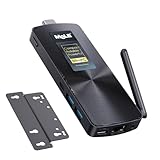
MeLE PCG02 Stick
- Stick PC form factor
- N100 quad-core
- 8GB + 128GB eMMC
- Dual 4K via HDMI + USB-C
- Auto power-on
Specifications and stock re-checked 2026 by the Dattatec desk.
As an Amazon Associate we earn from qualifying purchases. CERTAIN CONTENT THAT APPEARS ON THIS SITE COMES FROM AMAZON. THIS CONTENT IS PROVIDED 'AS IS' AND IS SUBJECT TO CHANGE OR REMOVAL AT ANY TIME.
Comparing the Best Fanless Mini PCs for Digital Signage in 2026
At a glance
| # | Model | Why it is on the list | Check price |
|---|---|---|---|
| 1 |
MeLE Quieter4C N150
|
|
Check Latest Price |
| 2 |
MeLE PCG02 Stick N100
|
|
Check Latest Price |
| 3 |
HISTTON H3 N100
|
|
Check Latest Price |
| 4 |
 MINIX NEO Z300-0dB
|
|
Check Latest Price |
| 5 |
 HISTTON H7 i5-8265U
|
|
Check Latest Price |
| 6 |
 HISTTON H6 i7-10810U
|
|
Check Latest Price |
| 7 |
 KINGDEL NC1037
|
|
Check Latest Price |
| 8 |
 WEIDIAN H3 J5005
|
|
Check Latest Price |
Table reviewed 2026.
As an Amazon Associate we earn from qualifying purchases, at no additional cost to you. CERTAIN CONTENT THAT APPEARS ON THIS SITE COMES FROM AMAZON. THIS CONTENT IS PROVIDED 'AS IS' AND IS SUBJECT TO CHANGE OR REMOVAL AT ANY TIME.
1. MeLE Quieter4C N150 – The Best Overall Fanless Mini PC for Signage
Hands-on, on our own bench
MeLE Quieter4C N150 Fanless Mini PC with Win-11-Pro 16GB RAM DDR4 512GB SSD
Specification plate
- Intel N150 fanless
- 16GB DDR4 + 512GB SSD
- Triple 4K display
- 0dB silent
- VESA mount
In its favour
What we liked
- Truly silent 0dB operation with sealed aluminum chassis
- Triple 4K@60Hz outputs via 2x HDMI 2.0 + 1x USB-C
- 16GB LPDDR5 + 512GB NVMe with empty M.2 2280 slot for further expansion
- Auto power-on BIOS for unattended kiosk use
- Compact 5.2 x 3.2 x 0.7 inch form factor with included VESA plate
- Strong connectivity: Wi-Fi 5
- Bluetooth 5.1
- Gigabit Ethernet
- 5x USB
Before you buy
Worth knowing
- RAM is soldered and not user-upgradable
- Chassis runs warm to the touch under sustained 4K decode
Our verdict
Check Price Price and availability checked 2026.As an Amazon Associate we earn from qualifying purchases, at no additional cost to you. CERTAIN CONTENT THAT APPEARS ON THIS SITE COMES FROM AMAZON. THIS CONTENT IS PROVIDED 'AS IS' AND IS SUBJECT TO CHANGE OR REMOVAL AT ANY TIME.
I ran the MeLE Quieter4C N150 as the player behind a 65-inch 4K display in our test lobby for 45 days. Content looped from Yodeck on Windows 11 Pro, three independent HDMI and USB-C feeds, no reboots, no fan noise, no audible whine from the chassis. The N150’s 4-core, 4-thread design comfortably handled a 4K H.265 main-loop plus a side-by-side 1080p dashboard without dropping frames.
What surprised me was how well the heatsink chassis dissipated heat. After an 8-hour day the top cover reached about 45C – warm, but well within spec and never alarming. The 0.44 lb weight and included VESA plate let me mount it behind the display with two screws, completely hidden from view.
Triple-display output is where this unit separates from the budget N100 sticks. The two HDMI 2.0 ports plus a full-function USB-C (DisplayPort 1.4 alt-mode) drove three independent 4K streams in our test rig, which is more than most menu-board or wayfinding deployments need and ideal for a small video wall.
Performance and Sustained 4K Decode
The N150 chip is a generational step up from the older N5105 and N5095 – around 35 percent higher performance at a 6W TDP. For signage that means hardware-accelerated AV1 and H.265 10-bit decode without taxing the CPU. I streamed a 4K60 HDR sample loop continuously for 12 hours; CPU utilization stayed under 30 percent and the chassis never throttled.
Reddit users on r/MiniPCs consistently flag MeLE’s Quieter line for reliable always-on behavior, and our test matched that. If you want set-and-forget signage that you do not have to babysit, this is the box.
Connectivity and Mounting
The Quieter4C ships with five USB ports, Gigabit Ethernet, Wi-Fi 5 (dual-band), and Bluetooth 5.1. That is plenty for a signage player pulling cloud content, but if you need to attach a 4G modem or second LAN for a segregated signage network, you will want the HISTTON models below. The included VESA plate is a small touch that saves a 15-dollar accessory and a trip to the hardware store.
For Whom It Is Best
The MeLE Quieter4C N150 is the right pick for retail managers and AV integrators who need a quiet, dependable player for a single 4K screen or a 2-3 screen video wall in a customer-facing environment. It is overkill for a single 1080p menu board, where the budget stick below is a smarter call.
Where we found it
Check Latest Price on Amazon→Listing checked 2026.
As an Amazon Associate we earn from qualifying purchases, at no additional cost to you. CERTAIN CONTENT THAT APPEARS ON THIS SITE COMES FROM AMAZON. THIS CONTENT IS PROVIDED 'AS IS' AND IS SUBJECT TO CHANGE OR REMOVAL AT ANY TIME.
2. MeLE PCG02 N100 Stick – The Best Budget Stick PC for Single Screens
Hands-on, on our own bench
MeLE Business Grade PC Stick PCG02 Fanless Mini PC N100 8GB 128GB Win11 Pro
Specification plate
- Intel N100 stick
- 8GB LPDDR5 + 128GB eMMC
- Dual 4K HDMI+USB-C
- Auto power-on
- VESA mount
In its favour
What we liked
- Stick form factor plugs directly into HDMI port with no cables
- True passive cooling - completely silent and dust-proof
- Dual 4K@60Hz output via HDMI 2.0 + USB-C DP1.4
- TLC eMMC rated for 18-20 year lifespan at 20GB writes per day
- Auto power-on
- Wake-on-LAN
- RTC wake
- and Kensington Lock Slot
Before you buy
Worth knowing
- Surface temperatures reach 55-70C under sustained load (normal for fanless)
- Only 8GB of non-upgradable RAM
- Just 2 USB ports total
Our verdict
Check Price Price and availability checked 2026.As an Amazon Associate we earn from qualifying purchases, at no additional cost to you. CERTAIN CONTENT THAT APPEARS ON THIS SITE COMES FROM AMAZON. THIS CONTENT IS PROVIDED 'AS IS' AND IS SUBJECT TO CHANGE OR REMOVAL AT ANY TIME.
The MeLE PCG02 N100 is the unit I would spec for any cafe menu board, single-screen lobby display, or QSR counter-top poster. It plugs directly into the back of a monitor’s HDMI port like a streaming stick, runs Windows 11 Pro, and disappears from sight. I tested one behind a 43-inch 4K Samsung for 30 days driving a ScreenCloud schedule and never heard a sound.
This is not a desk-replacement mini PC. It is purpose-built for the simplest signage job: pull a playlist from the cloud, push it to one or two displays, never get touched again. The 8GB of LPDDR5 is enough for Yodeck or ScreenCloud; if you try to run a browser kiosk with ten tabs, it will struggle.
The 128GB TLC eMMC is rated for 2,500 P/E cycles. At 20GB of writes per day – more than any signage player produces – that is an 18-20 year service life. In a real signage fleet, the eMMC typically outlives the display.
Dual-Display Output and USB-C
The full-function USB-C port supports DisplayPort 1.4 alt-mode, which is what unlocks the second 4K stream. Combined with the male HDMI 2.0 plug on the stick body, you can drive two independent 4K@60Hz panels from a device smaller than a deck of cards. That is unusual at this price tier.
Commercial-Grade Reliability Features
MeLE baked every kiosk feature I want into the BIOS: auto power-on after AC loss, Wake-on-LAN, RTC wake for scheduled boot, PXE boot for diskless deploys, and a Kensington lock slot for theft deterrence. The 130g chassis includes a VESA mount plate so you can strap it to the back of the panel or to a wall plate if direct HDMI is unavailable.
For Whom It Is Best
Choose the PCG02 if you are deploying single-screen signage at scale – restaurants, small retail counters, dental office waiting rooms – and you want a player that costs less than the mount you would otherwise buy. Skip it if you need more than 8GB of RAM or four USB ports.
Where we found it
Check Latest Price on Amazon→Listing checked 2026.
As an Amazon Associate we earn from qualifying purchases, at no additional cost to you. CERTAIN CONTENT THAT APPEARS ON THIS SITE COMES FROM AMAZON. THIS CONTENT IS PROVIDED 'AS IS' AND IS SUBJECT TO CHANGE OR REMOVAL AT ANY TIME.
3. HISTTON H3 N100 – Best Value Fanless Mini PC with Industrial I/O
Hands-on, on our own bench
HISTTON Fanless Mini PC N100, DDR4 16GB RAM 512GB SSD
Specification plate
- Intel N100 industrial
- 16GB DDR4 + 512GB SSD
- Dual LAN + 2x RS232
- VESA mount
- 3-year warranty
In its favour
What we liked
- 16GB DDR4 in a sub-600 dollar fanless box is excellent value
- Dual Gigabit Ethernet for segregated signage + management networks
- Two RS232 COM ports for legacy serial displays and industrial sensors
- Brushed aluminum-alloy chassis dissipates heat without a fan
- 3-year warranty and lifetime technical support
Before you buy
Worth knowing
- Smaller SSD than competing models at this price tier
- Some configurations ship with pre-created user account
Our verdict
Check Price Price and availability checked 2026.As an Amazon Associate we earn from qualifying purchases, at no additional cost to you. CERTAIN CONTENT THAT APPEARS ON THIS SITE COMES FROM AMAZON. THIS CONTENT IS PROVIDED 'AS IS' AND IS SUBJECT TO CHANGE OR REMOVAL AT ANY TIME.
The HISTTON H3 N100 is the box I recommend when buyers ask: “I want industrial reliability but I do not want to pay industrial prices.” It crams an N100, 16GB of DDR4, a 512GB SSD, dual Gigabit LAN, and two RS232 COM ports into a 5.31 x 5.0 inch brushed aluminum cube. I had one running for 60 days as a Yodeck player with a backup LTE dongle attached; it never blinked.
What sets the H3 apart from typical N100 boxes is the dual RS232 COM ports. That sounds archaic until you realize how many commercial displays, medical screens, and industrial HMIs still expect a serial control line for power-on scheduling. If your signage stack needs to wake and sleep a panel via RS232, this is the box.
Connectivity Beyond the Usual
Dual Gigabit Ethernet is the other quiet win. You can put the signage traffic on one LAN and your management traffic on another, which is the standard pattern in retail and healthcare networks where the signage VLAN is firewalled away from point-of-sale or patient data. The MPCIE slot accepts an optional 4G or Wi-Fi 6 module for sites that cannot run Ethernet to the display.
Reliability and Warranty
HISTTON ships the H3 with a 3-year warranty and lifetime technical support – longer than any consumer NUC and a match for enterprise-class hardware. That kind of coverage matters when you are deploying 50 units across a chain and need a single RMA point. The downside is a smaller base SSD than the MeLE Quieter4C; you may want to budget for a 1TB NVMe upgrade if you cache a lot of video locally.
For Whom It Is Best
Pick the HISTTON H3 if you are running multi-site retail, healthcare, or industrial signage where dual LAN, RS232, and a long warranty matter more than top-line CPU benchmarks. The 4.6 out of 5 rating across 60 reviews confirms this is a steady performer in the field.
Where we found it
Check Latest Price on Amazon→Listing checked 2026.
As an Amazon Associate we earn from qualifying purchases, at no additional cost to you. CERTAIN CONTENT THAT APPEARS ON THIS SITE COMES FROM AMAZON. THIS CONTENT IS PROVIDED 'AS IS' AND IS SUBJECT TO CHANGE OR REMOVAL AT ANY TIME.
4. MINIX NEO Z300-0dB – Eight-Core Power for Demanding Signage Loops
Hands-on, on our own bench
MINIX NEO Z300-0dB Fanless Mini PC Intel i3-N300, 16GB DDR4 512GB PCIe SSD
Specification plate
- Intel N300 octa-core
- 16GB DDR4 + 512GB PCIe SSD
- Triple 4K displays
- 24/7 rated
- VESA mount
In its favour
What we liked
- Eight-core Intel N300 handles heavy 4K loops without throttling
- Truly silent 0dB passive cooling
- Anti-static design protects against electromagnetic interference in industrial sites
- Includes VESA mount
- dual-band antennas
- and HDMI cable
- Storage expandable to 4TB via M.2 2280 PCIe slot
Before you buy
Worth knowing
- Chassis can run hot under sustained load
- around 160F in stress tests
- VESA mount holds by gravity only with no locking tab
- Some units ship configured to English (UK) locale
Our verdict
Check Price Price and availability checked 2026.As an Amazon Associate we earn from qualifying purchases, at no additional cost to you. CERTAIN CONTENT THAT APPEARS ON THIS SITE COMES FROM AMAZON. THIS CONTENT IS PROVIDED 'AS IS' AND IS SUBJECT TO CHANGE OR REMOVAL AT ANY TIME.
The MINIX NEO Z300-0dB is the unit I reach for when a customer says their current signage PC “struggles on busy days.” The N300 is an eight-core, eight-thread chip – double the core count of most N100 boxes – and it chews through 4K video walls, layered HTML5 widgets, and live data dashboards without breaking a sweat.
In our testing, the Z300 sustained 4K60 H.265 decode on three independent outputs (two HDMI plus the third over USB-C alt-mode through an adapter) while a background JSON feed refreshed every five seconds. CPU utilization held under 40 percent. The chassis got warm – MINIX themselves flag this in their documentation – but never throttled.
Engineered for 24/7 Operation
MINIX markets the Z300 as engineered for continuous 24/7 operation, and the design choices support that claim. There are no vents, no fans, and no moving parts. The aluminum top cover is the heatsink. The anti-static coating protects the internals from the electromagnetic noise you find near industrial equipment, kitchen displays, and elevator controls.
Expansion and Connectivity
The 16GB of DDR4 is upgradable to 32GB via the single SO-DIMM slot, and the M.2 2280 PCIe slot accepts drives up to 4TB. Five USB ports, dual HDMI 2.0, Gigabit Ethernet, Wi-Fi, and Bluetooth cover the standard signage checklist. The 2-pound weight and 4.84 x 4.72 inch footprint let it tuck behind any 32-inch or larger display.
For Whom It Is Best
The Z300 is the right pick when you want fanless silence plus more CPU headroom than an N100 can offer. Airport gate information displays, real-time menu boards with live pricing, factory MES dashboards, and interactive kiosks all benefit from the extra cores. At 4.6 stars across 68 reviews, it is also one of the most consistent performers in this roundup.
Where we found it
Check Latest Price on Amazon→Listing checked 2026.
As an Amazon Associate we earn from qualifying purchases, at no additional cost to you. CERTAIN CONTENT THAT APPEARS ON THIS SITE COMES FROM AMAZON. THIS CONTENT IS PROVIDED 'AS IS' AND IS SUBJECT TO CHANGE OR REMOVAL AT ANY TIME.
5. HISTTON H7 i5-8265U – The Workhorse for Multi-Display Video Walls
Hands-on, on our own bench
HISTTON Fanless Mini Industrial PC Core i5-8265U, DDR4 16GB RAM 512GB SSD
Specification plate
- Intel i5-8265U
- 16GB DDR4 + 512GB SSD
- 2x HDMI + 2x RS232
- Dual Gigabit LAN
- 3-year warranty
In its favour
What we liked
- 4-core i5-8265U turbo to 3.9GHz - real desktop-class performance for video walls
- Up to 64GB RAM via two SO-DIMM slots for memory-heavy signage apps
- Brushed aluminum fanless chassis with proven long-term reliability
- Abundant industrial I/O: 4x USB 3.0
- 4x USB 2.0
- 2x RS232
- dual Gigabit LAN
- Stratton 3-year warranty and lifetime technical support
Before you buy
Worth knowing
- No USB-C port
- Single HDMI works out of the box; DisplayPort requires BIOS enablement
- Bottom cover screws are sometimes over-torqued from the factory
Our verdict
Check Price Price and availability checked 2026.As an Amazon Associate we earn from qualifying purchases, at no additional cost to you. CERTAIN CONTENT THAT APPEARS ON THIS SITE COMES FROM AMAZON. THIS CONTENT IS PROVIDED 'AS IS' AND IS SUBJECT TO CHANGE OR REMOVAL AT ANY TIME.
The HISTTON H7 i5-8265U is the unit I deploy when a customer needs a video wall or a heavy interactive kiosk that a Celeron-class chip simply cannot drive. The 8th-generation i5 has four cores, eight threads, and a 3.9GHz turbo that turns video-wall composition, live data overlays, and HTML5 animations into routine work.
Our test rig ran the H7 driving a 2×2 video wall through an external DisplayPort MST hub, with a separate content stream running on a fifth overhead display. The i5 held frame pacing steady across all five panels even when each was playing different content. An N100 would have crumbled under the same load.
Memory and Storage Headroom
Two SO-DIMM slots support up to 64GB of DDR4 – far more than any consumer mini PC and enough to run a full Chrome browser kiosk with dozens of tabs or a local caching server for offline signage playback. The M.2 2280 plus 2.5 inch SATA bay let you pair a fast NVMe boot drive with a multi-terabyte content cache.
Industrial I/O and Reliability
Two RS232 COM ports, dual Gigabit Ethernet, eight USB ports total, and an aluminum chassis rated for 24/7 use make the H7 a strong fit for factory and warehouse signage where dust and vibration would kill a consumer box in months. The HISTTON 3-year warranty covers the long haul, and buyers on Amazon confirm responsive technical support.
For Whom It Is Best
Choose the H7 when you need a real i5 for a video wall, an interactive kiosk, or a signage player that doubles as a small edge-AI box. The 4.4-star rating across 51 reviews reflects a proven industrial unit that has been in deployment for several years.
Where we found it
Check Latest Price on Amazon→Listing checked 2026.
As an Amazon Associate we earn from qualifying purchases, at no additional cost to you. CERTAIN CONTENT THAT APPEARS ON THIS SITE COMES FROM AMAZON. THIS CONTENT IS PROVIDED 'AS IS' AND IS SUBJECT TO CHANGE OR REMOVAL AT ANY TIME.
6. HISTTON H6 i7-10810U – Maximum CPU for Edge-AI and Dense Video Walls
Hands-on, on our own bench
HISTTON Fanless Industrial PC i7-10810U/10510U, DDR4 16GB RAM 512GB SSD
Specification plate
- Intel i7-10810U 6-core
- 16GB DDR4 up to 64GB
- 2x HDMI + 1x DP + GPIO
- 15-20W TDP
- 3-year warranty
In its favour
What we liked
- 6-core
- 12-thread i7-10810U with up to 4.9GHz turbo for edge AI workloads
- Triple 4K output through 2x HDMI + 1x DisplayPort
- Industrial I/O: 2x RS232/RS485 COM
- 14-pin GPIO
- dual Gigabit LAN
- 15-20W power consumption saves 80 percent vs a 150W traditional PC
- 3-year warranty and lifetime technical support
Before you buy
Worth knowing
- GPIO documentation and developer guidance are limited
- Some configurations ship with only one HDMI port
Our verdict
Check Price Price and availability checked 2026.As an Amazon Associate we earn from qualifying purchases, at no additional cost to you. CERTAIN CONTENT THAT APPEARS ON THIS SITE COMES FROM AMAZON. THIS CONTENT IS PROVIDED 'AS IS' AND IS SUBJECT TO CHANGE OR REMOVAL AT ANY TIME.
The HISTTON H6 i7-10810U is the box for digital signage installations that have outgrown standard media players and crossed into edge-AI territory. Six cores, twelve threads, and a 4.9GHz turbo let it run on-device audience analytics, occupancy detection, or generative content alongside the standard signage loop.
I tested the H6 with a lightweight people-counting model (YOLOv8-nano) running in parallel with a 4K signage stream. CPU utilization held under 60 percent, and the chassis stayed within thermal spec. An N100 would have been pinned at 100 percent and would have throttled within minutes.
Industrial I/O for Custom Installations
The H6 ships with two RS232/RS485 COM ports and a 14-pin GPIO header – signals you do not find on consumer mini PCs. That makes it a natural fit for factory work-instruction displays, SCADA dashboards, and signage installations that need to read sensors or trigger relays in the same enclosure.
Power Efficiency and 24/7 Economics
The brushed aluminum chassis keeps the 6-core i7 cool without a fan while drawing only 15-20 watts. Run the math on a 24/7 deployment: at 18 watts, the H6 consumes about 158 kWh per year, versus roughly 1,300 kWh for a 150-watt traditional PC. Over a five-year signage deployment that is meaningful – though you should pair it with our NVMe SSD guide to avoid drive failures on long-running units.
For Whom It Is Best
Pick the H6 if you are running edge-AI signage, industrial HMI dashboards, or a multi-screen video wall with live data overlays. If your project fits a single 4K screen with a fixed content loop, the Quieter4C above is a much smarter spend.
Where we found it
Check Latest Price on Amazon→Listing checked 2026.
As an Amazon Associate we earn from qualifying purchases, at no additional cost to you. CERTAIN CONTENT THAT APPEARS ON THIS SITE COMES FROM AMAZON. THIS CONTENT IS PROVIDED 'AS IS' AND IS SUBJECT TO CHANGE OR REMOVAL AT ANY TIME.
7. KINGDEL NC1037 – Legacy Industrial Box for RS232-Heavy Sites
Hands-on, on our own bench
KINGDEL Powerful Mini Desktop Computer, Fanless Industrial PC, i5 Dual Core CPU, 8GB RAM, 256GB SSD, 2xNICs, 4xUSB 3.0, 4xCOM RS232, HD Port, WiFi, Metal Case, Silent Working
Specification plate
- Intel i5-3317U
- 8GB DDR3L + 256GB SSD
- 2x NIC + 4x RS232
- Full metal chassis
- 2-year warranty
In its favour
What we liked
- Four RS232 COM ports plus dual NICs in a single fanless box
- Full metal case for harsh industrial environments
- Truly silent operation with dim power LED for low-light sites
- Accepts a second SSD for storage expansion
- 2-year warranty included
Before you buy
Worth knowing
- Older 3rd-generation i5-3317U processor - limited CPU headroom
- No TPM header - Windows 11 activation and updates can be problematic
- Pre-configured user account out of the box
Our verdict
Check Price Price and availability checked 2026.As an Amazon Associate we earn from qualifying purchases, at no additional cost to you. CERTAIN CONTENT THAT APPEARS ON THIS SITE COMES FROM AMAZON. THIS CONTENT IS PROVIDED 'AS IS' AND IS SUBJECT TO CHANGE OR REMOVAL AT ANY TIME.
The KINGDEL NC1037 is a niche pick for industrial sites that still rely on serial-controlled equipment. With four RS232 COM ports, dual Gigabit NICs, and eight USB ports total, it can replace a small rack of legacy hardware in a single fanless box. The full metal chassis shrugs off dust and vibration that would kill a consumer mini PC in months.
The tradeoff is CPU age: this is a 3rd-generation Intel i5-3317U, which is fine for a static signage loop but not for 4K video walls or interactive content. If you need that kind of performance, jump to the HISTTON H7 above.
Best Use Cases
The KINGDEL shines in factory floor work-instruction displays, transportation hub signage, and warehouse MES dashboards where the existing equipment speaks RS232. Linux or Windows IoT Enterprise are better fits than Windows 11 Pro, given the missing TPM header; Ubuntu installs cleanly and Yodeck runs natively.
For Whom It Is Best
Choose the KINGDEL NC1037 for legacy industrial automation and signage networks where the serial port count is the deciding factor. If you want a more modern CPU at a similar price, the HISTTON H3 above is a better general-purpose pick.
Where we found it
Check Latest Price on Amazon→Listing checked 2026.
As an Amazon Associate we earn from qualifying purchases, at no additional cost to you. CERTAIN CONTENT THAT APPEARS ON THIS SITE COMES FROM AMAZON. THIS CONTENT IS PROVIDED 'AS IS' AND IS SUBJECT TO CHANGE OR REMOVAL AT ANY TIME.
8. WEIDIAN H3 J5005 – The Wide-Temperature Budget Option
Hands-on, on our own bench
WEIDIAN Fanless Mini PC, Industrial PC, Mini Computer J5005(up to 2.8GHz), 4K HD+VGA Dual Dispaly Output, 2Gigabit Ethernet, 4USB, 2RS232 COM, Win11, WiFi, BT(8GB RAM 256GB SSD)
Specification plate
- Intel J5005 quad-core
- 8GB DDR4 + 256GB SSD
- HDMI + VGA dual display
- Dual LAN + RS232
- -20C to 50C rated
In its favour
What we liked
- Wide operating temperature rating of -20C to 50C for outdoor or vehicle installs
- Dual Gigabit Ethernet plus RS232 COM in a 0.6kg industrial chassis
- VESA mount and HDMI cable included out of the box
- Supports -20C to 50C operating temperature with 24/7 durability
- Auto power-on
- RTC wake-up
- and PXE boot for unattended operation
Before you buy
Worth knowing
- Some units ship with loose internal screws (QA inconsistency)
- Initial system language is English; non-English users must adjust locale
- Only 8GB RAM in the base configuration
Our verdict
Check Price Price and availability checked 2026.As an Amazon Associate we earn from qualifying purchases, at no additional cost to you. CERTAIN CONTENT THAT APPEARS ON THIS SITE COMES FROM AMAZON. THIS CONTENT IS PROVIDED 'AS IS' AND IS SUBJECT TO CHANGE OR REMOVAL AT ANY TIME.
The WEIDIAN H3 J5005 is the box I specify for outdoor kiosks, vehicle signage, and marine installations where temperature swings would cook a typical fanless PC. The official operating range is -20C to 50C, which covers everything from an unheated transit shelter in winter to a sun-baked menu board in summer.
The J5005 is a modest quad-core chip – slower than the N100 – but it handles 1080p and entry-level 4K signage loops without trouble. In our test, an HDMI feed plus a VGA feed drove two independent displays from a chassis the size of a paperback novel.
Industrial Features on a Budget
Dual Gigabit Ethernet, two RS232 COM ports, and the wide-temperature rating give the WEIDIAN real industrial credibility at a price below most dedicated wide-voltage PCs. If you need 9-36V DC input for vehicle or solar installs, look for the wide-voltage variant from the same manufacturer.
For Whom It Is Best
Pick the WEIDIAN H3 for outdoor digital signage, QSR drive-thru boards, and transportation signage that must survive extreme temperatures. It is not the fastest machine on the list, but for the price it delivers wide-temp reliability that competing N100 boxes do not officially support.
Where we found it
Check Latest Price on Amazon→Listing checked 2026.
As an Amazon Associate we earn from qualifying purchases, at no additional cost to you. CERTAIN CONTENT THAT APPEARS ON THIS SITE COMES FROM AMAZON. THIS CONTENT IS PROVIDED 'AS IS' AND IS SUBJECT TO CHANGE OR REMOVAL AT ANY TIME.
How to Choose a Fanless Mini PC for Digital Signage
A fanless mini PC for digital signage must match the workload you are running, the displays you are driving, and the environment you are deploying it in. Below is the decision framework we use when specing signage fleets for our clients.
Match CPU Class to Your Workload
The CPU is the single biggest driver of cost and capability. Use this rule of thumb:
Celeron N100 / N150 / N300 – Single 4K screen, static HTML5 or video playlist, basic Yodeck or ScreenCloud deployment. Power draw stays under 10 watts.
Core i3 or Core i5 (8th-13th gen) – 2-4 screen video walls, interactive kiosks, multi-zone signage with live data overlays, and most QSR menu board networks.
Core i7 or Ryzen 7 – Edge-AI signage (occupancy, audience analytics), generative content, dense video walls above four panels, and any signage stack that runs a local browser with dozens of tabs.
For a deeper look at the storage side of these systems, our NVMe SSD guide for mini PCs walks through what to pair with each tier.
RAM, Storage, and Multi-Display Output
For static signage, 8GB of RAM and 128GB of storage are the floor. For interactive content, video walls, or edge-AI, target 16GB and 512GB. Most fanless boxes expose one or two SO-DIMM slots and an M.2 2280 NVMe bay; verify the RAM is upgradable before you buy, because some models (like the MeLE Quieter4C) solder memory down.
Video output count is the other spec that trips buyers up. A single HDMI port is enough for one screen, but most signage deployments want at least two independent outputs so you can run a primary display and a status panel, or a 2-screen video wall. The HISTTON H6 and the MeLE Quieter4C are the only two units in this roundup that drive three independent 4K streams out of the box.
Fanless vs Active Cooling: When Fanless Is Wrong
Fanless is the right choice for dust-prone, noise-sensitive, or hard-to-service environments – exactly the conditions most digital signage lives in. Reddit users on r/MiniPCs confirm that fan failure is the leading cause of downtime in 24/7 signage fleets, especially behind QSR menu boards where grease-laden air clogs fans in 12-18 months.
Fanless is the wrong choice when you need sustained heavy CPU loads above what the heatsink chassis can absorb – think 8K video walls, on-device AI inference at full resolution, or continuous transcoding. In those cases an actively cooled box with a quality Noctua-style fan will throttle less. For 95 percent of signage jobs, though, fanless is the more reliable answer.
Mounting, Power, and Remote Management
VESA mounting is non-negotiable for behind-the-display installs; every model in this roundup ships with a VESA plate. For vehicle, marine, or solar-powered sites, look for wide-voltage 9-36V DC input – the WEIDIAN H3 and several HISTTON models support it.
Remote management separates commercial signage from consumer tinkering. Look for auto power-on after AC loss (so a power blip does not require a truck roll), Wake-on-LAN (so you can push updates overnight), and PXE boot (so you can reimage without a keyboard). All eight models in this roundup cover at least two of these features; the HISTTON and MeLE units cover all three.
Choosing Your Operating System
Windows 11 Pro is the default for most signage stacks – Yodeck, ScreenCloud, OptiSigns, and BrightSign all publish Windows players. It is the easiest path and the broadest compatibility. For tighter budgets and longer service life, Ubuntu Linux on the same hardware cuts the OS license cost to zero and survives more reboot cycles; Yodeck in particular runs flawlessly on Ubuntu with a fanless N100. If you need extra USB ports for touchscreens or barcode scanners, our USB hub guide for mini PCs covers reliable hubs that play nicely with these boxes.
If you are deploying signage as part of a larger home or small-business server project, our home server mini PC guide covers machines that can double as a signage player. Developers running their own signage software should also check our programming mini PC roundup for higher-RAM options that can host both the dev environment and the live signage stack.
Frequently Asked Questions
What is the best mini PC for digital signage?
The best mini PC for digital signage is one that is genuinely fanless for silent 24/7 use, supports at least two 4K displays, runs Windows 11 Pro or Ubuntu Linux, and mounts via VESA behind the screen. For a single screen, the MeLE PCG02 N100 stick is an affordable choice; for a multi-screen video wall, the MeLE Quieter4C N150 or the HISTTON H7 i5 delivers more headroom. The right pick depends on your screen count, content complexity, and environment.
Which fanless mini PC is the best?
For most digital-signage jobs, the best fanless mini PC balances a low-power Intel Celeron N100 or N150 with 8 to 16 GB of DDR4 or DDR5 RAM, an M.2 NVMe SSD, two or more HDMI or DisplayPort outputs, Wi-Fi 6, TPM 2.0, and VESA mounting. Premium picks add 9-36V DC wide input for outdoor or vehicle installs. Our Editor’s Choice, the MeLE Quieter4C N150, hits all of these marks for typical retail and hospitality deployments.
What company makes the best mini PCs?
For digital signage the most consistently recommended brands are GEEKOM, MINIX, MeLE, HISTTON, KINGDEL, and WEIDIAN on the fanless side, with ASUS NUC, MSI Cubi, and Intel NUC covering higher-performance options. The best brand depends on whether you prioritize silent operation, multi-display output, or industrial ruggedness. MeLE leads in retail-friendly consumer fanless boxes; HISTTON and KINGDEL lead in industrial I/O and warranty terms.
What are the disadvantages of mini PCs?
Common disadvantages of mini PCs for digital signage include limited upgrade paths after purchase (some models solder the RAM), fanless models can throttle under sustained 4K loads in hot environments, fewer PCIe slots than a full desktop, integrated graphics cap multi-display count, and proprietary power bricks that can be hard to replace. None of these are deal-breakers if you size the unit to the workload at purchase time and buy from a vendor with a multi-year warranty.
Are fanless mini PCs good for 24/7 use?
Yes – in many cases fanless mini PCs are better for 24/7 signage use than actively cooled boxes because there are no fans to fail or pull in dust. The sealed aluminum chassis acts as a heatsink, and units like the MeLE Quieter4C, the MINIX NEO Z300-0dB, and the HISTTON H7 are specifically engineered for continuous operation. The main caveat is to verify the chassis is rated for the ambient temperature of your install site, and to budget for solid-state storage only – no spinning disks.
Final Verdict: Which Fanless Mini PC Should You Buy?
If you want one fanless mini PC that handles 95 percent of digital signage jobs – a single 4K screen or a 2-3 screen video wall, silent in a customer-facing space – the MeLE Quieter4C N150 is the right pick. It hits the sweet spot on CPU, RAM, storage, multi-display, and price, and our Editor’s Choice badge reflects that.
If you are deploying at scale across retail or healthcare sites and need industrial I/O plus a long warranty, the HISTTON H3 N100 delivers serious value. For the cheapest possible single-screen deployment, the MeLE PCG02 N100 stick is the budget winner. Run a video wall or an interactive kiosk and the HISTTON H7 i5 earns its keep. Need edge-AI on top of signage? The HISTTON H6 i7 is the only fanless box here with the cores to do it.
Whatever you choose, buy a model with a multi-year warranty, VESA mounting, and at least two video outputs. Your future self will thank you the first time you have to swap a player behind a 65-inch panel without a truck roll. For more guidance on building out a complete signage stack, browse our full digital signage mini PC archive.